

New
New: A Sidebar Built Around Your Programs
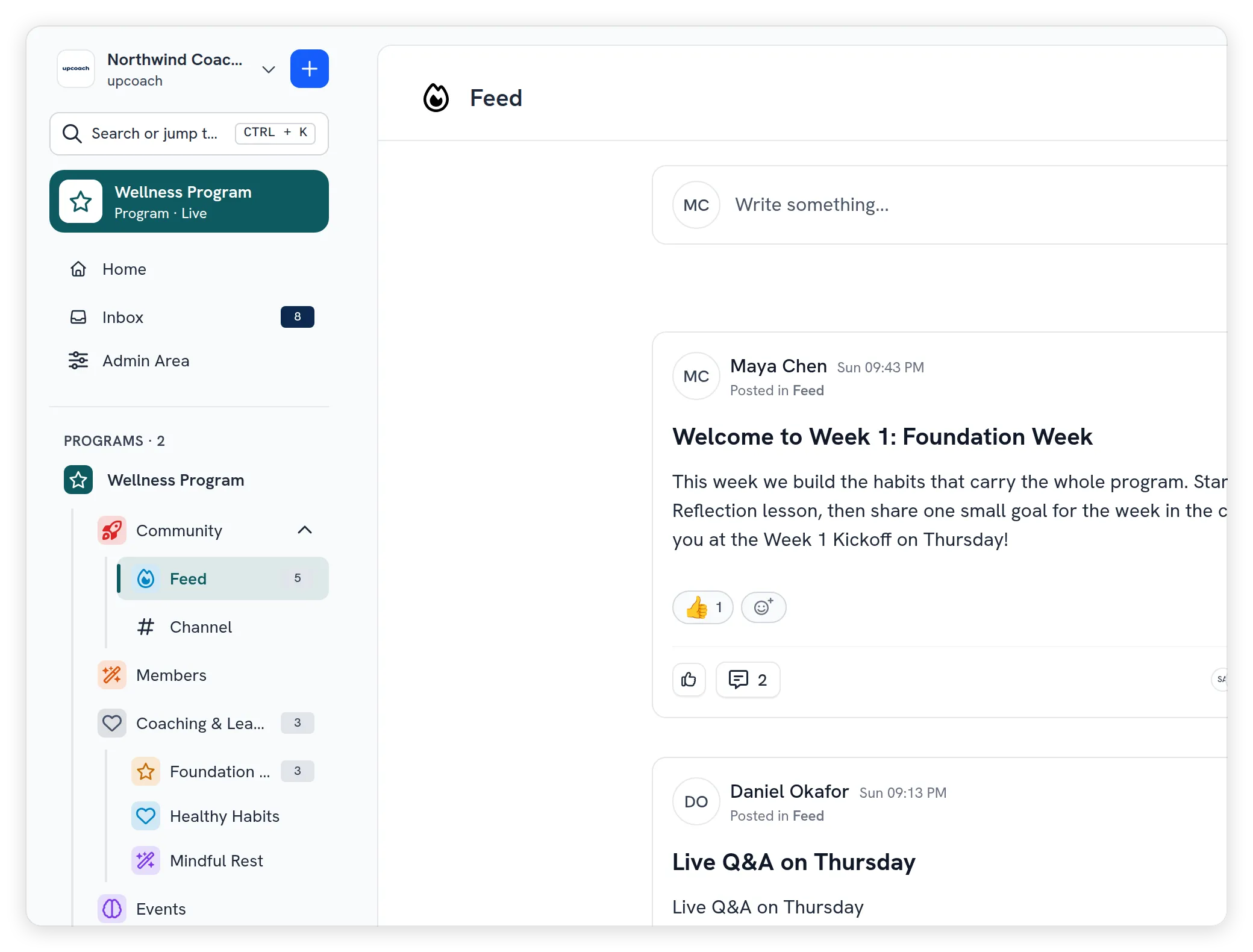
upcoach has a new sidebar. Everything that used to sit in the top bar now lives in it, your programs are easier to find however many you run, and each program can carry its own colour. It works the same way on a phone.
- Programs, everywhere: the app, emails and notifications say Program where they used to say Space. Your programs sit under a Programs heading with their count, and the one you open stays in view. Admins who open a program they aren’t a member of see it under Viewing as admin, and All programs in Admin Area lists every program in the workspace.
- Easier to read and act from: the page you’re on gets one highlight, a light tint with bold text and a bar on the left, readable in any colour and announced to screen readers. Every program and app has a ⋯ menu with what your role allows, from Copy link for everyone to rename, settings, members, duplicate and publish for the people who build the program.
- One place for everything: the + create menu, Help & support, your account menu and Inbox with its unread count are in the sidebar, and Inbox channels and threads open right inside it. Program settings open as their own page. Press [ to collapse the sidebar to a rail of icons when you want more room.
- Program colour, logo and app icons: the new Branding tab in Program Settings sets a program’s colour and logo and each app’s icon and colour, with a live preview. Text needs a 4.5:1 contrast and bars and icons 3:1, and any colour that falls short is darkened automatically, so every colour stays readable.
- Search or jump to: press ⌘K, Ctrl+K or / to find a program, one of its apps, an admin page or your account settings by name, with your recent places first.
- A new phone layout: ☰ opens the full sidebar as a drawer, the bar at the top has Search and Inbox, and a program’s apps sit in tabs, with More for the rest.
Read Organize your sidebar, Program colour, logo and app icons, Search or jump to anything with ⌘K and Use upcoach on your phone for the details.