



Run your leadership cohort program and show the client the results.
You run cohort programs for a client's managers and leaders: a new-manager program, a leadership academy, a course built around your own model. Run it in upcoach: the live sessions, the work between them, a self-assessment at the start and the end, and reports the client's sponsor can open.
Start from one of two formats.
Pick a program type when you create a program and upcoach builds its structure. You rename it, set the first date and add your own material.
A cohort course for managers
e.g. New Manager Cohort
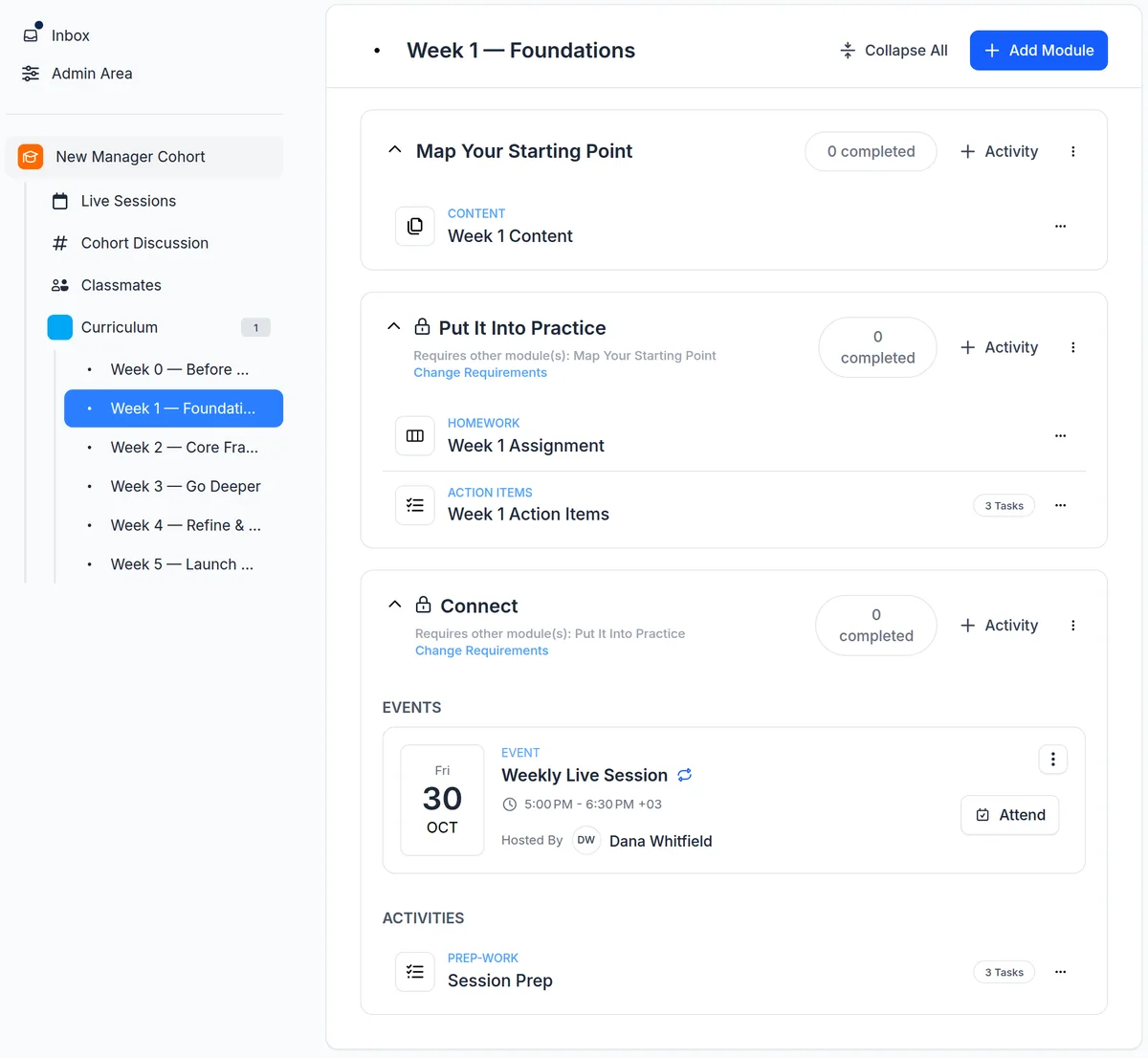
Cohort-Based Course: everyone starts together, moves through the material on the same schedule and finishes together, over five weeks plus a pre-work week.
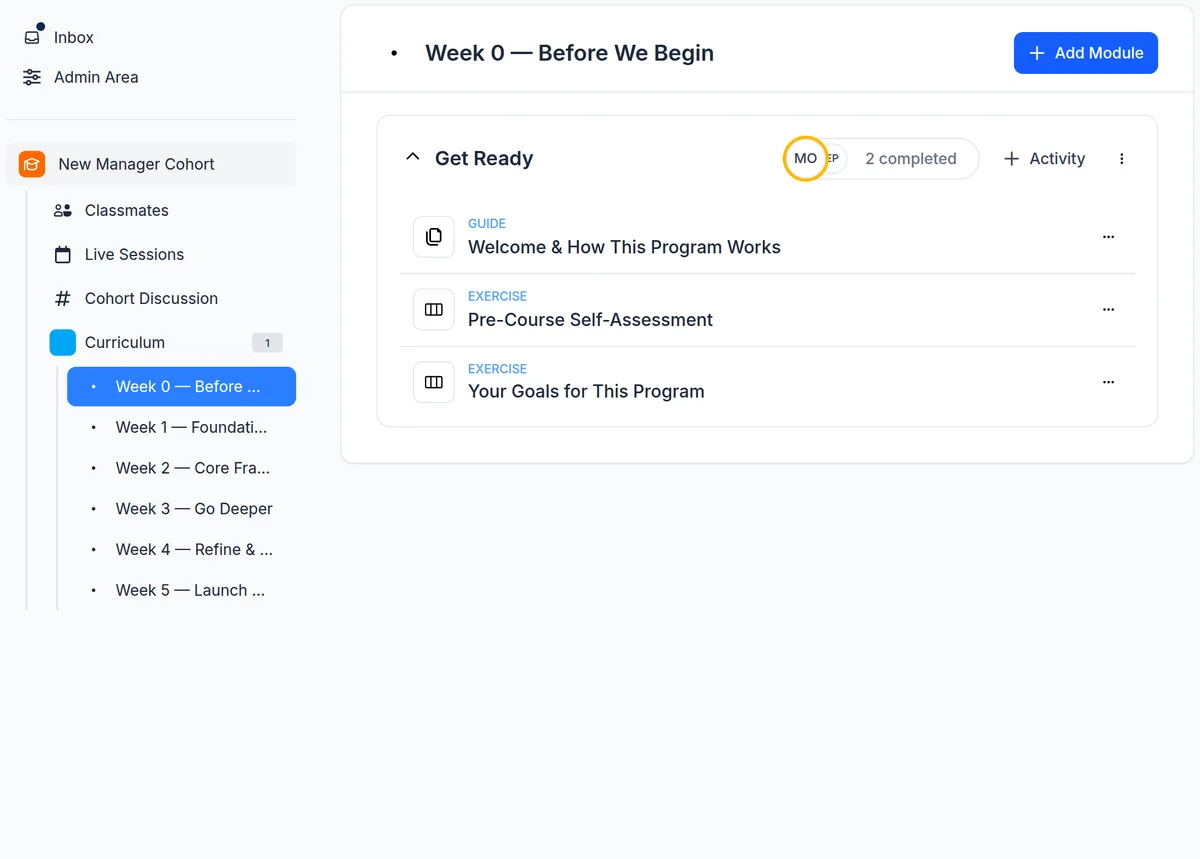
- Week 0 opens on enrollment, with a pre-course self-assessment and a goals worksheet for your own questions
- Four teaching weeks in three steps, the lesson, the practice and the live session, each unlocking once the one before it is done
- A 90-minute live session every week, linked to its week, with a sample agenda that includes peer feedback or a breakout
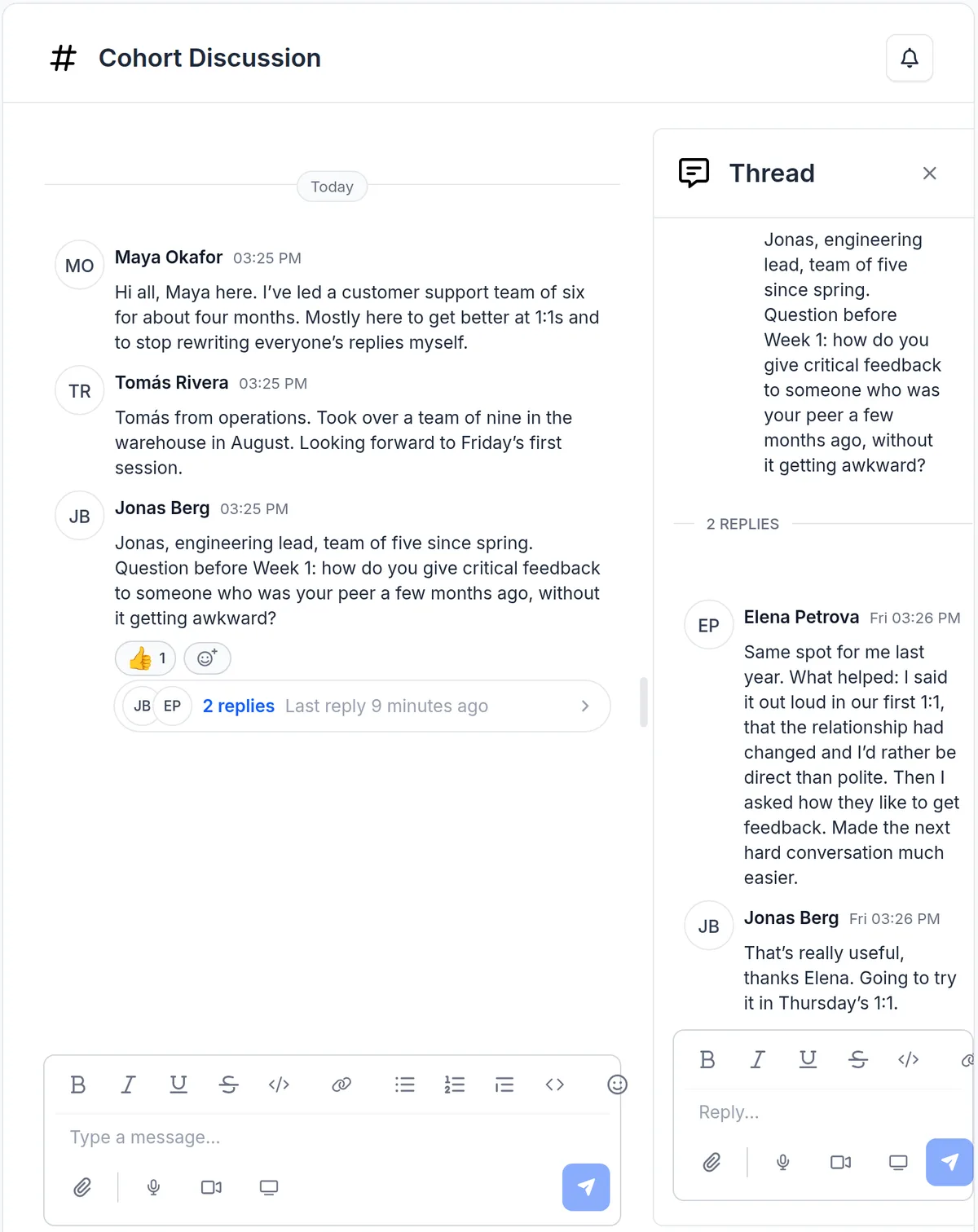
- A Cohort Discussion channel and a Classmates directory
A 12-week leadership program
e.g. Leadership Accelerator
Group Coaching: a curriculum the group works through together, with live calls for the coaching.
- 12 weekly sections in three phases, each released on schedule from your first call date
- A weekly or bi-weekly group call linked to the week's module, with a sample agenda
- A baseline self-assessment in week 1, a mid-program pulse in week 6 and a final reflection in week 12
- A community channel and a member directory
See where each leader started, and where they finished.
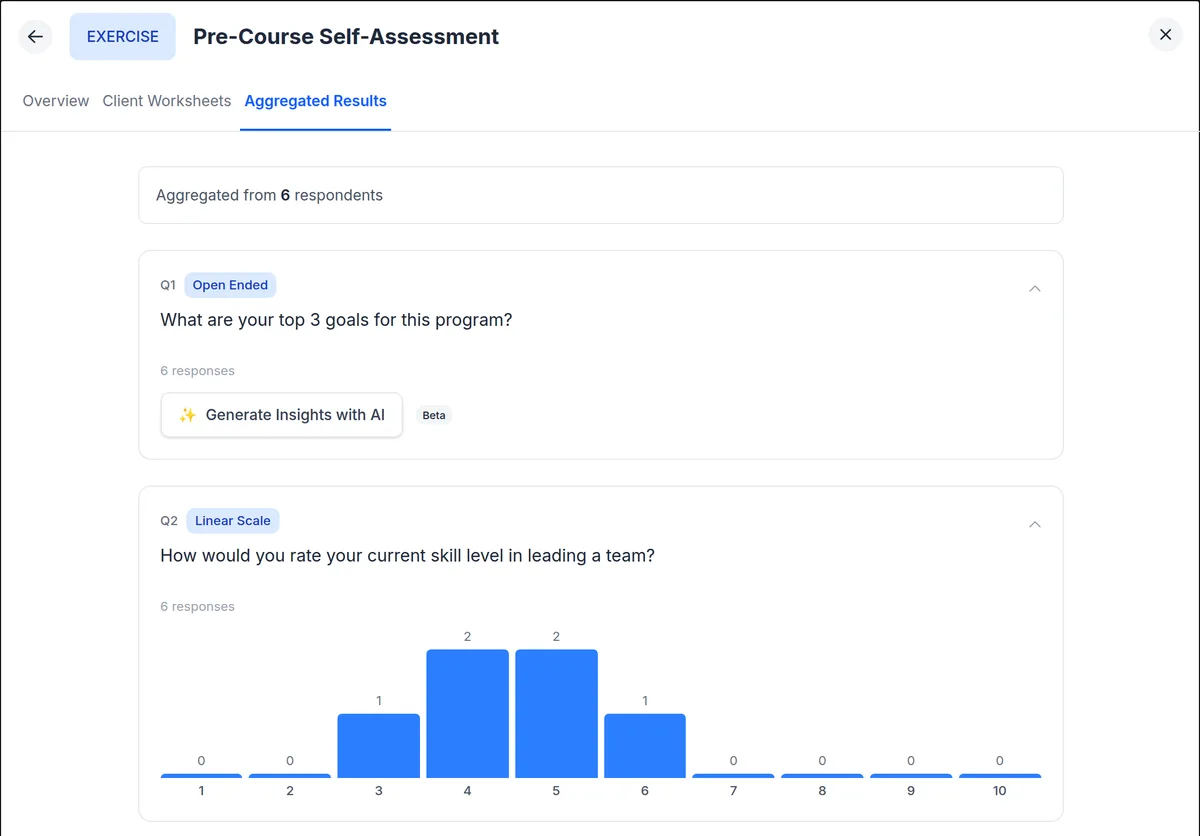
Both formats start with a self-assessment and end with a final reflection that repeats the skill rating from the start, so you can compare before and after. Edit the questions to fit your model, and add your own worksheets, such as a reflection on each leader's 360 results or strengths profile.
- Eight question types, including rating scales, a wheel of 6 to 12 areas rated 1 to 10, ranking and open text
- Results per question across the cohort, with AI-generated insights on open answers
- A mid-point pulse survey on value and progress, so you can adjust before the second half
- Let the whole cohort see the answers, or only the program's admins
Progress the sponsor can see, without reading what leaders write.
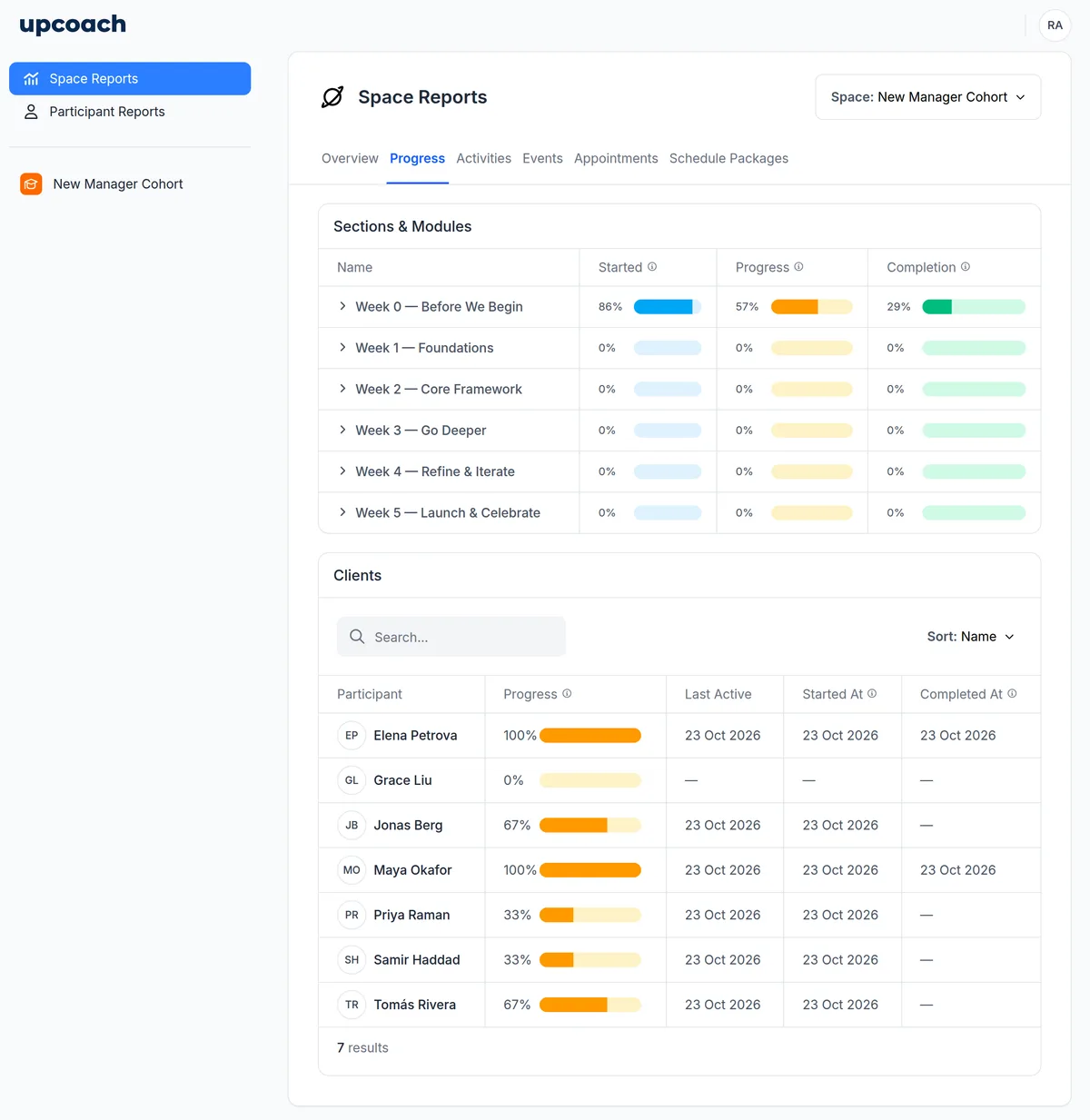
Add the client's HR or L&D lead to the program as a Reporting Sponsor. They see the program's content and its reports, overall and for each participant, and never the worksheet answers, journals, comments or channels. At the end of the cohort, send them an impact report.
- Space Reports: progress by section, completion of every activity, and attendance at live sessions once you mark it
- A CSV export that says whether a response was submitted, never what it said
- Read-only: a Reporting Sponsor can't post and gets no program notifications
- An impact report you send through a private link: group totals, an AI-written summary and themes from leaders' reflections, which you review before sharing
Leaders learn from each other too.
Each format comes with a discussion channel and a member directory, so leaders can find each other and keep the conversation going between live sessions.
- Threads, mentions and reactions, and voice, video or screen recordings of up to three minutes
- Peer groups inside one cohort, each with its own members, with events or sections just for them
- Turn on feedback for a live session, and leaders rate it on value, guidance, content and engagement, anonymously if they choose
How to set up a leadership cohort in upcoach
- 1
Pick the program type
Choose Cohort-Based Course for a five-week cohort, or Group Coaching for a 12-week program, when you create the program.
- 2
Name it and set the first date
Give it the cohort's name and set the first session date and time. The sessions and the weekly release dates are created from it.
- 3
Add your assessments
Edit the baseline and final reflection questions to fit your model, and add your own assessments as worksheets.
- 4
Add the leaders and the sponsor, then publish
Invite leaders directly or share your registration page, add the client's sponsor as a Reporting Sponsor, then publish. A new program starts as a draft that participants can't see until you publish it.
Questions from leadership development firms
What is a leadership cohort?
A leadership cohort is a group of managers or leaders who go through a development program together. They start on the same date, work through the same material on the same schedule, meet for live sessions and learn from each other between them.
How do I run a leadership cohort program in upcoach?
Create a program with the Cohort-Based Course program type for a five-week cohort with a pre-work week, or with Group Coaching for a 12-week program. upcoach builds the weekly sections, the live sessions, a self-assessment at the start and a final reflection at the end, a discussion channel and a member directory. You add your material, invite the leaders and publish.
Can I use DiSC, Five Behaviors, CliftonStrengths or a 360?
Leaders take those assessments with the vendor, as you license them; upcoach doesn't connect to assessment vendors. Then add a worksheet where each leader works through their results, with rating scales, a wheel, ranking or open questions, and see the answers across the cohort.
What can the client's sponsor see?
A Reporting Sponsor sees the program's content and its reports: progress overall and per participant, completions and dates, and a CSV export. They never see worksheet or check-in answers, journals, comments or channels. If the sponsor should read everything participants write, and participants know it, use the Program Sponsor role instead.
How do I show the client the results of the cohort?
Share the program's progress with a Reporting Sponsor, and at the end create an impact report for programs with at least five participants: group totals for enrollment, completion and engagement, session feedback if you turned it on, an AI-written summary and themes from participants' reflections. It opens as a draft you can edit, never shows a figure that could point to one to four people, and is shared through a private link that works for 7, 30 or 90 days.
Can I run cohorts for several client organizations?
Yes. Run each cohort as its own program, with its own leaders and its own sponsor. Roles are set per program, so a sponsor sees only the programs you add them to.
Can I reuse the program for the next cohort?
Yes. Duplicate the program: the copy keeps your curriculum and settings, starts without participants, and recalculates the release dates from the new start date. Then add the new cohort's live sessions.
Set up your next leadership cohort today.
Start with the cohort course or the 12-week program, add your assessments and the client's sponsor, and invite your first leaders.