



Run your peer advisory board and the follow-up between meetings.
You chair a peer advisory board for CEOs or business owners: a meeting every month or every two weeks, a confidential Hot Seat, and a commitment from every member. Run it in upcoach: the meetings and a Hot Seat agenda, the conversation between them, and the commitments and numbers members report, with answers you can hide from the other members.
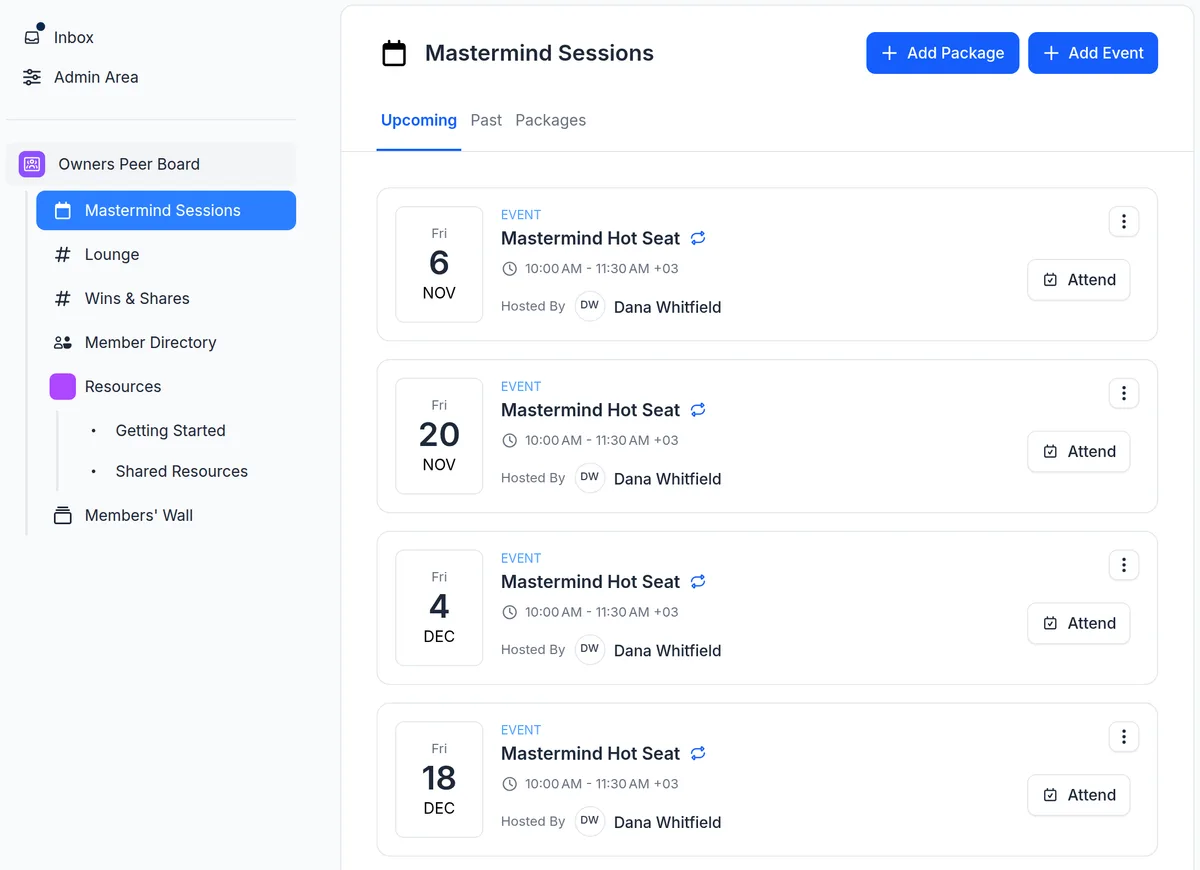
One program type, two rhythms.
Pick the Mastermind program type when you create a program and upcoach builds a six-month peer board. You rename it and set the first meeting. For a monthly board, swap the bi-weekly meetings for a monthly series.
A bi-weekly peer board
e.g. Owners Peer Board
Mastermind, as it's built: members bring real problems to the room and leave with commitments.
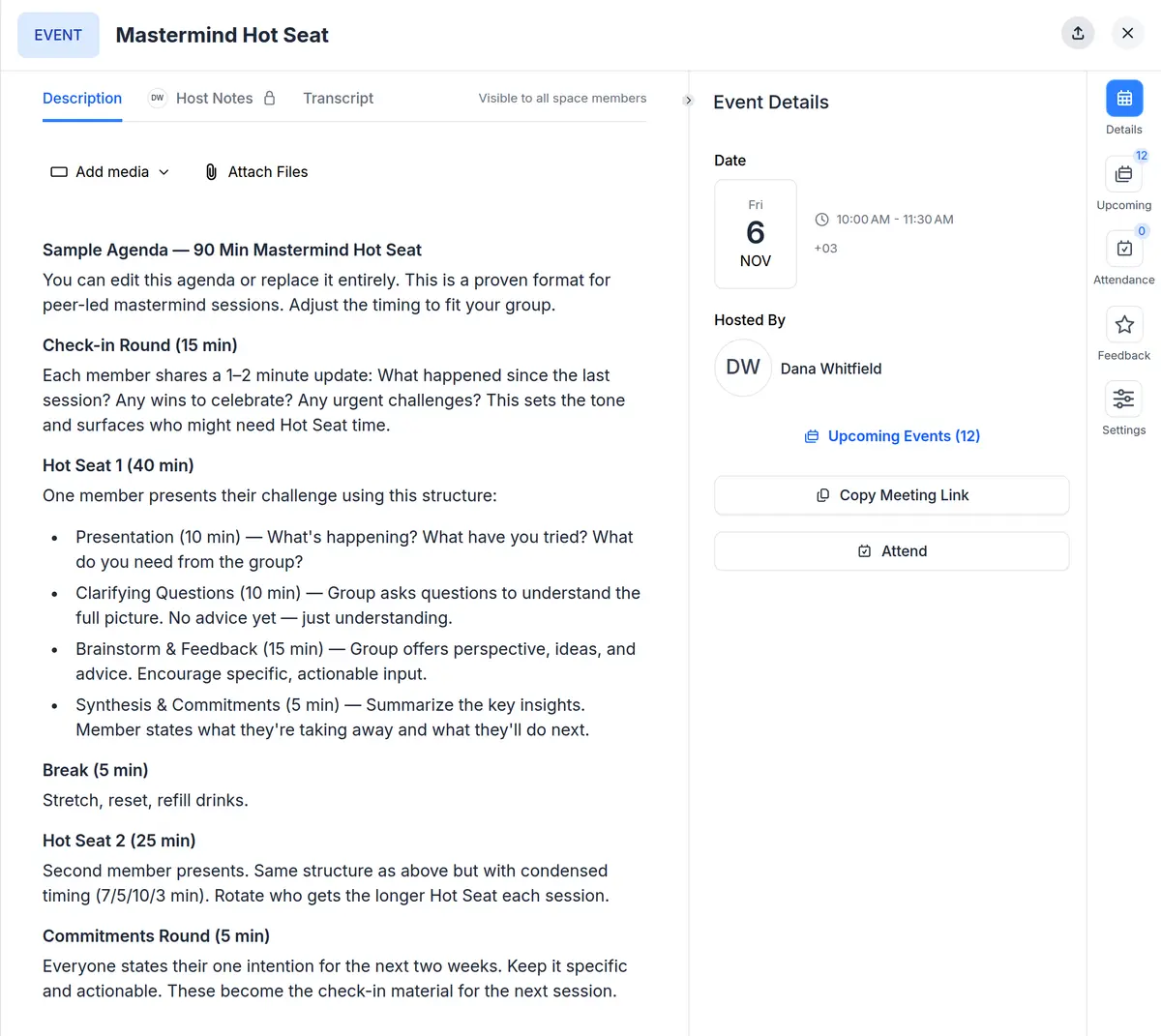
- 12 bi-weekly 90-minute Hot Seat meetings, with a sample agenda on the first: a check-in round, two Hot Seats and a commitments round
- A Hot Seat Format guide for members: presentation, clarifying questions, brainstorm and feedback, synthesis and commitments
- A Lounge channel and a Wins & Shares channel for between meetings
- A Members' Wall, a member directory and a member profile worksheet
A monthly owners' forum
e.g. Owners Forum
The same program type, meeting once a month: delete the bi-weekly meetings and add a series that repeats monthly.
- Repeat on the same date each month, or on a pattern like the second Tuesday of every month
- Up to 24 meetings in one series
- Add the agenda to each meeting: the free template below has one to copy
- The same channels, Members' Wall and member directory
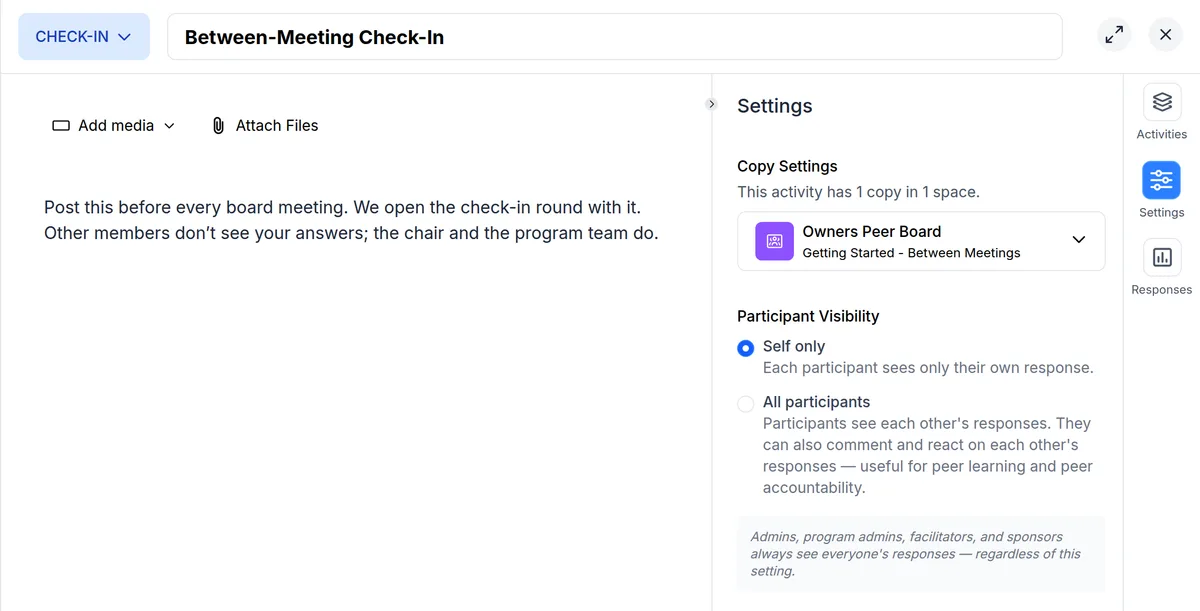
Members see their own answers. You see everyone's.
A Hot Seat works when members bring the real numbers and the real problem. Set a check-in, worksheet or task list to self only, and each member sees only their own response. You, as the chair, and your program team still see everyone's.
- Self only or all participants, set on each check-in, worksheet and task list
- The member profile worksheet starts visible to the whole board, so members know each other before the first meeting
- Hide the member list if members shouldn't see who else is in the program; names still show in channels and on the Members' Wall
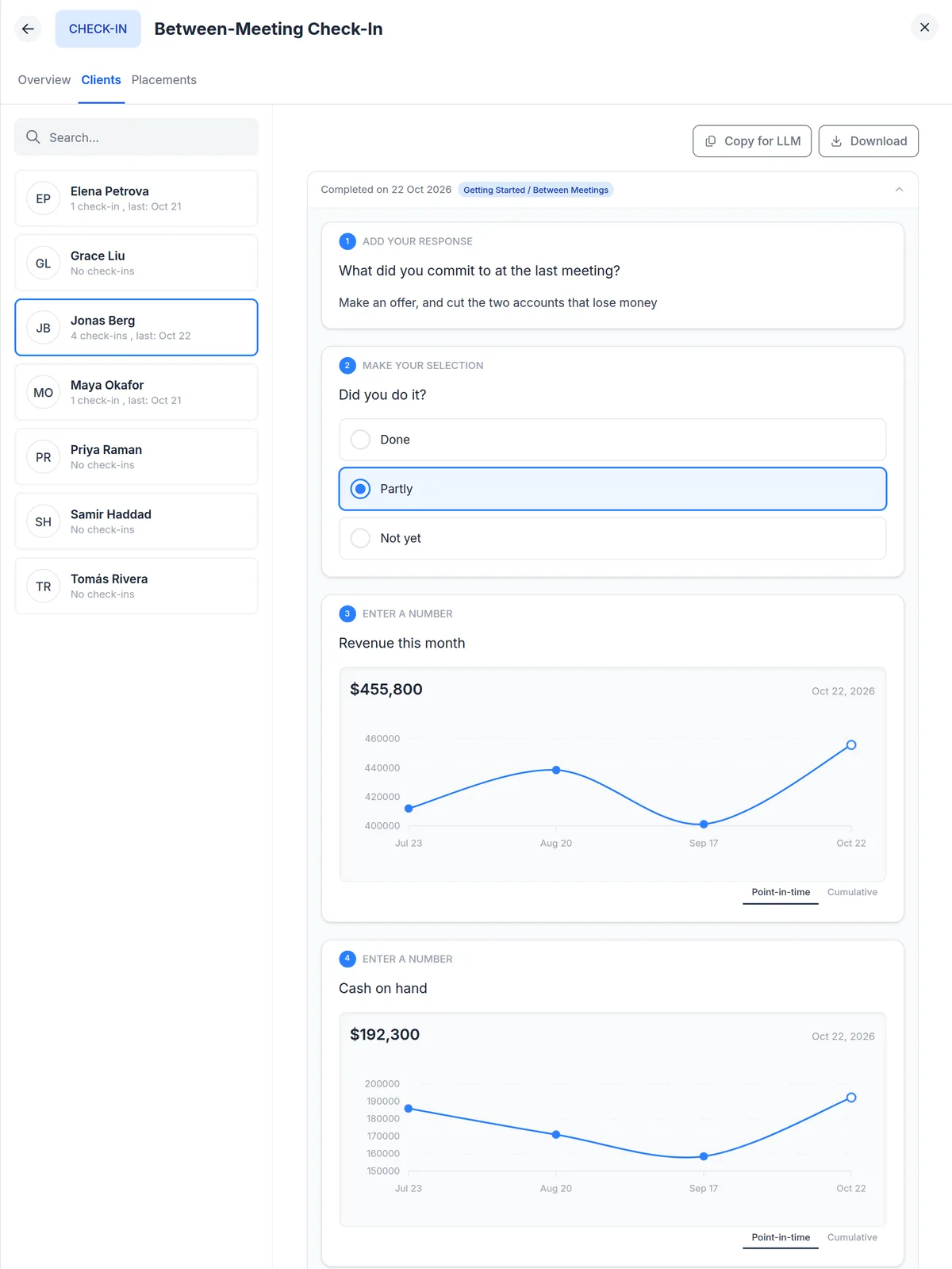
The commitment made in the room, reported before the next one.
Add a check-in where each member writes down the commitment they made, reports whether they did it and posts their numbers. A check-in has no schedule: you set the rhythm, for example by asking members to post before every meeting and opening the check-in round with it. For what the whole board agreed to do, add a task list: the same items for every member, each ticked off on their own.
- Number questions with a unit, such as revenue or cash on hand, and a trend graph from a member's second answer
- Up to 10 questions: numbers, rating scales, multiple choice, open text, or a file upload
- Each member's history, and who hasn't answered yet
- A task list shows you who has finished every item, and who hasn't started
One program per board, or groups inside one.
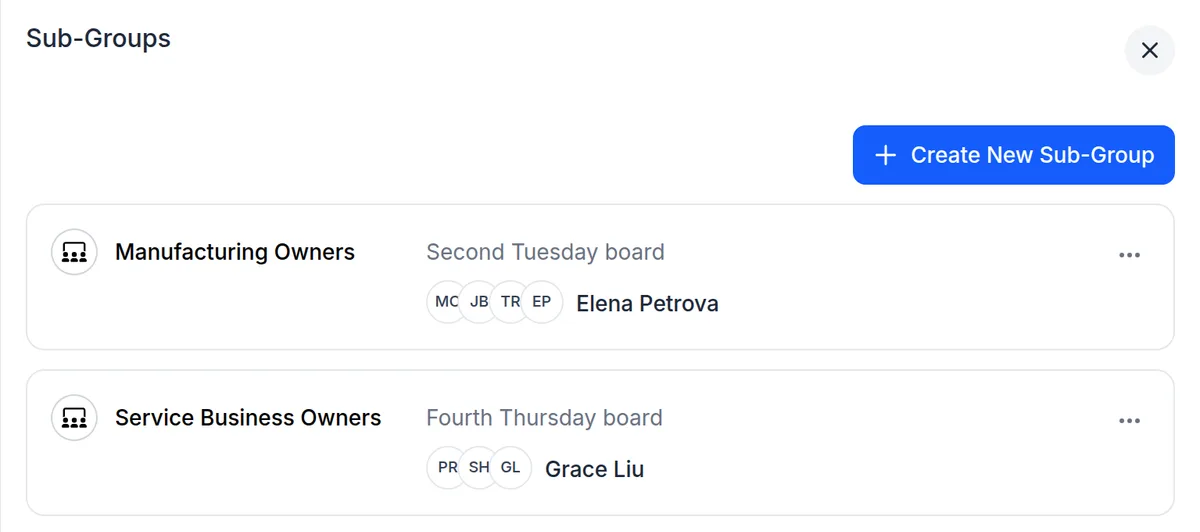
Run each board as its own program, with its own members, meetings and channels. Roles are set per program, so a co-chair you add to one board as Program Admin or Facilitator sees only that board. Or keep one program and split it into subgroups, with meetings and sections just for each group.
- Subgroups that every member can see, or only admins
- Duplicate a board to start the next one: the copy keeps your content and settings and starts without members
- Every new program starts as a draft that members can't see until you publish it
How to set up a peer advisory board in upcoach
- 1
Pick the program type
Choose Mastermind when you create the program. It sets up six months of bi-weekly Hot Seat meetings, two channels, a Members' Wall and a member directory.
- 2
Name it and set the first meeting
Give it the board's name and set the first meeting date and time. For a monthly board, replace the bi-weekly meetings with a monthly series.
- 3
Add the between-meeting work
Add a check-in for each member's commitment and numbers, set to self only, and a task list for anything the whole board agreed to do.
- 4
Add your members and publish
Invite members directly or share your registration page, then publish. A new program starts as a draft that members can't see until you publish it.
Questions from peer advisory board chairs
What is a peer advisory board?
A peer advisory board, or peer advisory group, is a small group of CEOs or business owners who meet regularly with a chair to work through each other's decisions. At each meeting, a member presents a real challenge in a Hot Seat, the group asks questions and gives advice, and every member leaves with a commitment the group follows up at the next meeting.
How do I run a CEO peer group in upcoach?
Create a program with the Mastermind program type. upcoach builds a six-month program with 12 bi-weekly 90-minute Hot Seat meetings, with a sample agenda on the first (a check-in round, two Hot Seats and a commitments round), plus a member directory, a Lounge channel, a Wins & Shares channel and a Members' Wall. You set the name and the first meeting date, add a check-in for commitments and numbers, invite your members and publish.
Is a peer advisory board the same as a mastermind for business owners?
They work the same way: a small group of peers meets on a regular rhythm, takes turns in the Hot Seat and holds each other to commitments. In upcoach both start from the Mastermind program type, and you rename the program to whatever your members call it.
Can the board meet monthly instead of every two weeks?
Yes. The Mastermind program type creates bi-weekly meetings. Delete them and add an event series that repeats monthly, on the same date or on a pattern like the second Tuesday of every month, with up to 24 meetings in a series.
What can members see, and what can I see as the chair?
Set a check-in, worksheet or task list to self only, and each member sees only their own responses or progress. All participants lets them see each other's, and comment and react on a worksheet or check-in. Either way, you and your program team see everyone's. Members see each other in the member list unless you hide it, and they see each other's names in channels and on the Members' Wall.
Does upcoach remind members to post their numbers?
No. A check-in has no schedule and sends no reminders. You set the rhythm: ask members to post before every meeting, and see in the check-in who hasn't answered yet.
Can I run several boards at once?
Yes. Run each board as its own program, with its own members, meetings and channels, or keep one program and split it into subgroups, each with its own members and with meetings just for them. To start a new board, duplicate an existing one: the copy keeps your content and settings and starts without members.
Can members use upcoach on their phone?
Yes. Members can use upcoach in the browser or in the upcoach mobile app.
Set up your next peer advisory board today.
Start with the Mastermind program type, add the check-in for commitments and numbers, and invite your first members.