


What happens when you cancel your plan
What happens when you cancel your plan
When you cancel, your plan keeps running until the end of the period you’ve paid for. Here’s what changes, and when.
When you cancel
- Your plan stays active until the end of your current billing period, and you won’t be charged again.
- The Billing page shows “Your subscription ends on [date]”, with a Resume button.
- We send you an email confirming the cancellation and the date. You keep full access until then.
- Depending on the reason you pick, we may offer an option first, such as moving to a smaller plan at your next billing date or pausing your plan for one to three months. You can take it or carry on canceling.

Canceling during a free trial works a little differently: see Cancel during your trial.
To cancel, see Cancel your subscription.
Changed your mind?
Before the end date, open the workspace menu (your workspace name, top left), choose Billing and click Resume. Your plan carries on as before.
When your plan ends
- Your workspace is locked. A screen covers it that can’t be closed, and changes aren’t saved.
- As the owner, you see a screen where you can pick a plan and reactivate. If the screen reads “Your subscription has ended.” without plans to pick, write to [email protected] to reactivate.
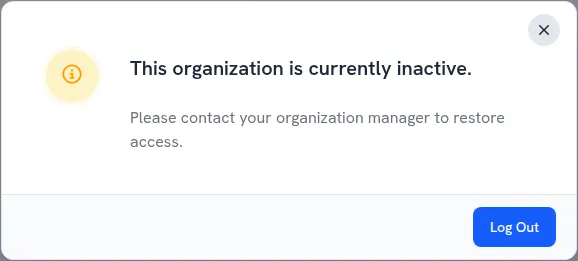
- Your team and participants see a message that the workspace is currently inactive.
- Your programs, content and data are kept. Nothing is deleted when a plan ends.

Reactivate later
Open your workspace, pick a plan on the reactivation screen and pay. Your workspace opens again with everything as you left it.
When there’s no Cancel button
You won’t see a cancel button if:
- you’re on a free trial without a saved card (the trial simply ends),
- your plan is a lifetime plan bought through AppSumo,
- a payment is overdue,
- your plan is paused or a pause is scheduled, or
- your plan has no Stripe subscription (for example, a custom or 2.0 plan set up by our team).
As the owner, you can end a pause yourself: if a pause is scheduled, click Don’t pause on the Billing page; if your plan is paused, click Resume now on the paused screen (this starts a new billing period today and charges your card). Once the pause is gone, the Cancel button shows again. For AppSumo plans, overdue payments and plans with no Stripe subscription, write to [email protected] and we’ll help.
On the original upcoach (2.0)
Owners open Billing, then in the Cancel Subscription card click Cancel subscription. On the Confirm cancellation page, pick a reason under Why are you canceling? and click Confirm. The plan ends at the end of the billing period. Lifetime plans bought through AppSumo can’t be canceled this way.
Want your data deleted?
Canceling doesn’t delete anything. To delete your account and its data, write to [email protected] from your account’s email address.