



Send events to your tools with webhooks
Send events to your tools with webhooks
A webhook sends an event from your workspace to a URL of yours as soon as it happens: someone joins a program, completes an activity, or buys an offer. Your tool gets each event as a signed POST with a JSON body.
Only an organization Owner, Admin or Implementation Admin can add webhooks. Event payloads include members’ names and email addresses, so only send them to tools you trust with that data.
The events
| Event | Sent when |
|---|---|
program.member_joined | Someone joins a program: added by an admin, invited, or through an offer. An invited person counts as joining when the invite is sent; invitation.accepted follows when they accept. A role change is not a join |
invitation.accepted | An invited person accepts and joins the workspace |
activity.completed | A member completes an activity for the first time |
event.rsvp | A member answers an event invitation, or changes their answer |
enrollment.created | Someone buys an offer, or joins a free one |
program.member_removed | Someone is removed from a program |
Add a webhook
- Open Admin Area > Integrations > Webhooks
- Enter the Endpoint URL. It must be
httpson the standard port (443), and reach the public internet - Under Events, tick the events to send
- Under Program, keep Every program or pick one program. With one program picked,
invitation.acceptedis sent only when the invitation includes that program - Click Add webhook
- Copy the signing secret from the green box. It won’t be shown again
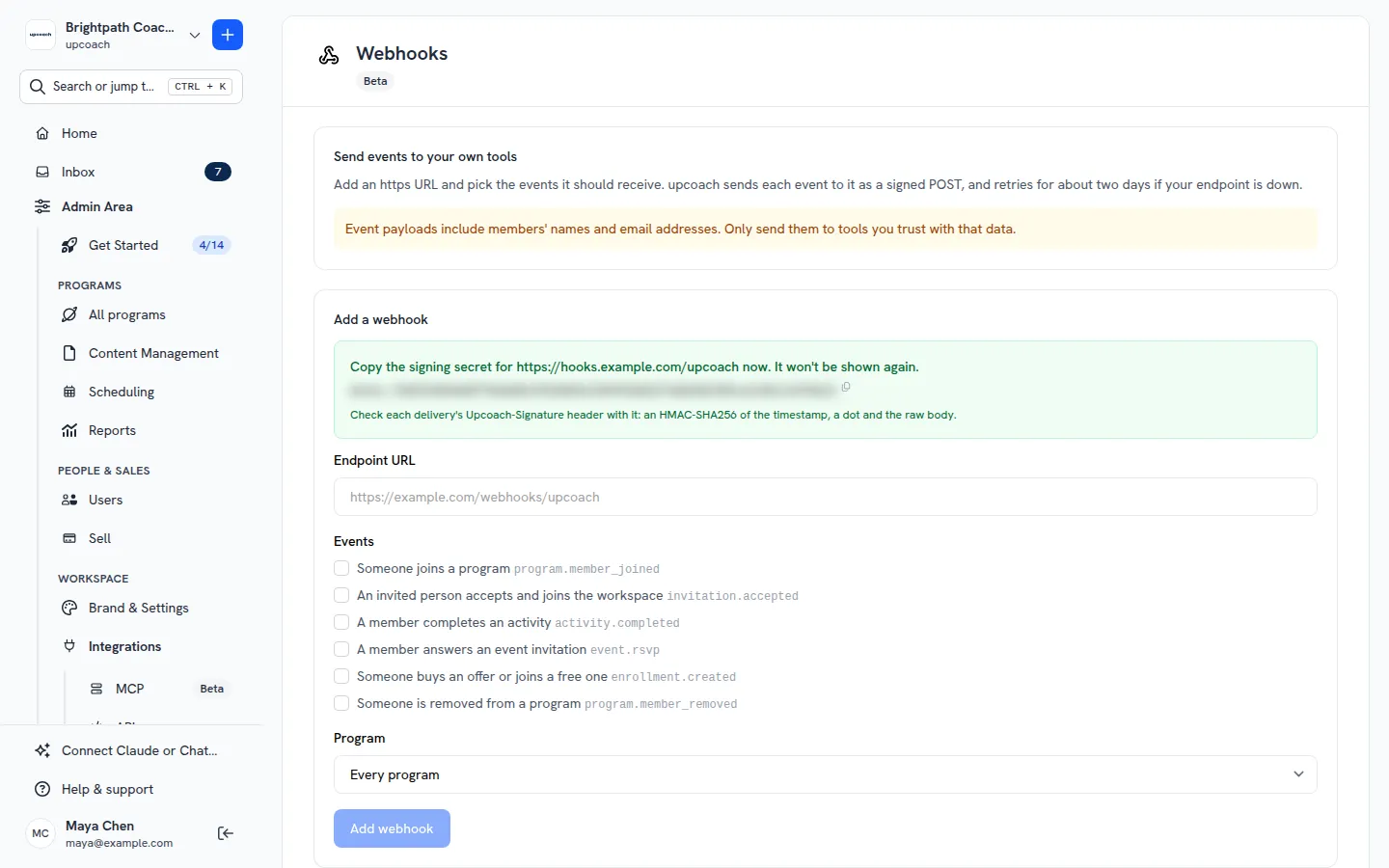
A workspace can have up to 25 webhooks added on this page. To add one from your own code instead, use POST /webhooks in the endpoint reference.
What a delivery looks like
Every delivery is a POST with these headers:
| Header | What it is |
|---|---|
Upcoach-Event | The event type, as in the body’s type |
Upcoach-Delivery | This attempt’s id. A retry gets a new one |
Upcoach-Signature | t=<unix time>,v1=<signature>, see below |
The body of a real program.member_joined delivery:
{
  "id": "evt_729bbc9e-71f4-4fcb-996f-0ddd1aa7c76c",
  "type": "program.member_joined",
  "created_at": "2026-11-11T05:55:43Z",
  "workspace": { "id": "org-1b547af4-c0cb-4f48-8d4e-d7a1fef601b2", "name": "Brightpath Coaching" },
  "data": {
    "program": { "id": "ef6e8b2e-7e21-4b84-af23-453203c0444e", "name": "12-Week Leadership Program", "url": "https://brightpath.upcoach.com/s/spaces/coaching-cohort" },
    "member": { "id": "6548f98c-5eb0-458c-80e9-441bf5116cae", "name": "Sam Rivera", "email": "[email protected]", "timezone": "UTC" },
    "role": "participant",
    "source": "invite",
    "joined_at": "2026-11-11T05:55:43Z"
  }
}
source is invite, purchase, free_join or admin_add. The other events carry:
activity.completed: the same fields as completionsenrollment.created: the same fields as enrollmentsprogram.member_removed:program,member,removed_atevent.rsvp:member,response(yesorno),event,program,responded_atinvitation.accepted:member,invited_by,programs,joined_at
To see the payloads your workspace sent recently, call GET /webhooks/samples/{event} (see the endpoint reference).
Check the signature
Check every delivery before you trust it. The Upcoach-Signature header looks like this:
t=1794376543,v1=710602c5ef2d760829143be5881eae4a5d21f82e847b69c899c9ab024898e70av1 is a hex HMAC-SHA256 signature made with your signing secret. To check it:
- Read
tand everyv1from the header - Compute the HMAC-SHA256 of
<t>.<raw body>with your secret. Use the body exactly as received, before parsing it - Accept the delivery if any
v1matches, compared in constant time - Refuse it if
tis more than 5 minutes from now
In Node.js:
const crypto = require('crypto')

function isFromUpcoach(header, rawBody, secret) {
  const parts = header.split(',').map((part) => part.trim().split('='))
  const t = parts.find(([key]) => key === 't')?.[1]
  const signatures = parts.filter(([key]) => key === 'v1').map(([, value]) => value)
  if (!t || Math.abs(Date.now() / 1000 - Number(t)) > 300) return false
  const expected = crypto.createHmac('sha256', secret).update(`${t}.${rawBody}`).digest('hex')
  return signatures.some((signature) =>
    /^[0-9a-f]{64}$/.test(signature) && crypto.timingSafeEqual(Buffer.from(signature), Buffer.from(expected)),
  )
}
In PHP:
function isFromUpcoach(string $header, string $rawBody, string $secret): bool
{
    $t = null;
    $signatures = [];
    foreach (explode(',', $header) as $part) {
        [$key, $value] = array_pad(explode('=', trim($part), 2), 2, '');
        if ($key === 't') { $t = (int) $value; }
        if ($key === 'v1') { $signatures[] = $value; }
    }
    if ($t === null || abs(time() - $t) > 300) { return false; }
    $expected = hash_hmac('sha256', $t . '.' . $rawBody, $secret);
    foreach ($signatures as $signature) {
        if (hash_equals($expected, $signature)) { return true; }
    }
    return false;
}
Answer, retries and duplicates
- Answer with any 2xx within 10 seconds. upcoach doesn’t follow redirects.
- Failed deliveries are retried after 1 minute, 5 minutes, 30 minutes, 2 hours, 6 hours, 12 hours and 24 hours: 8 attempts over about two days.
- The same event can arrive more than once. Its body
idstays the same across retries, so skip anidyou have already handled. - A 410 Gone to an event delivery deletes the webhook. Nothing more is sent to it. A 410 to Send test doesn’t.
- A webhook that keeps failing is turned off: when an event fails all 8 attempts and nothing else got through meanwhile, or when nothing gets through for 3 days. The workspace’s owners get an email. One event your endpoint refuses doesn’t stop the others.
Test it and read the delivery log
Next to each webhook under Webhooks:
- Send test sends a
webhook.testevent and shows what your endpoint answered. You can send 5 tests a minute - Deliveries shows the last 50 deliveries: event, time, attempt, your endpoint’s answer, and the body. Bodies are kept for 7 days, the rest for 30
- Rotate secret gives you a new signing secret. For 24 hours, deliveries carry two
v1values, one per secret, while you update your endpoint - Delete stops the webhook and deletes its delivery log
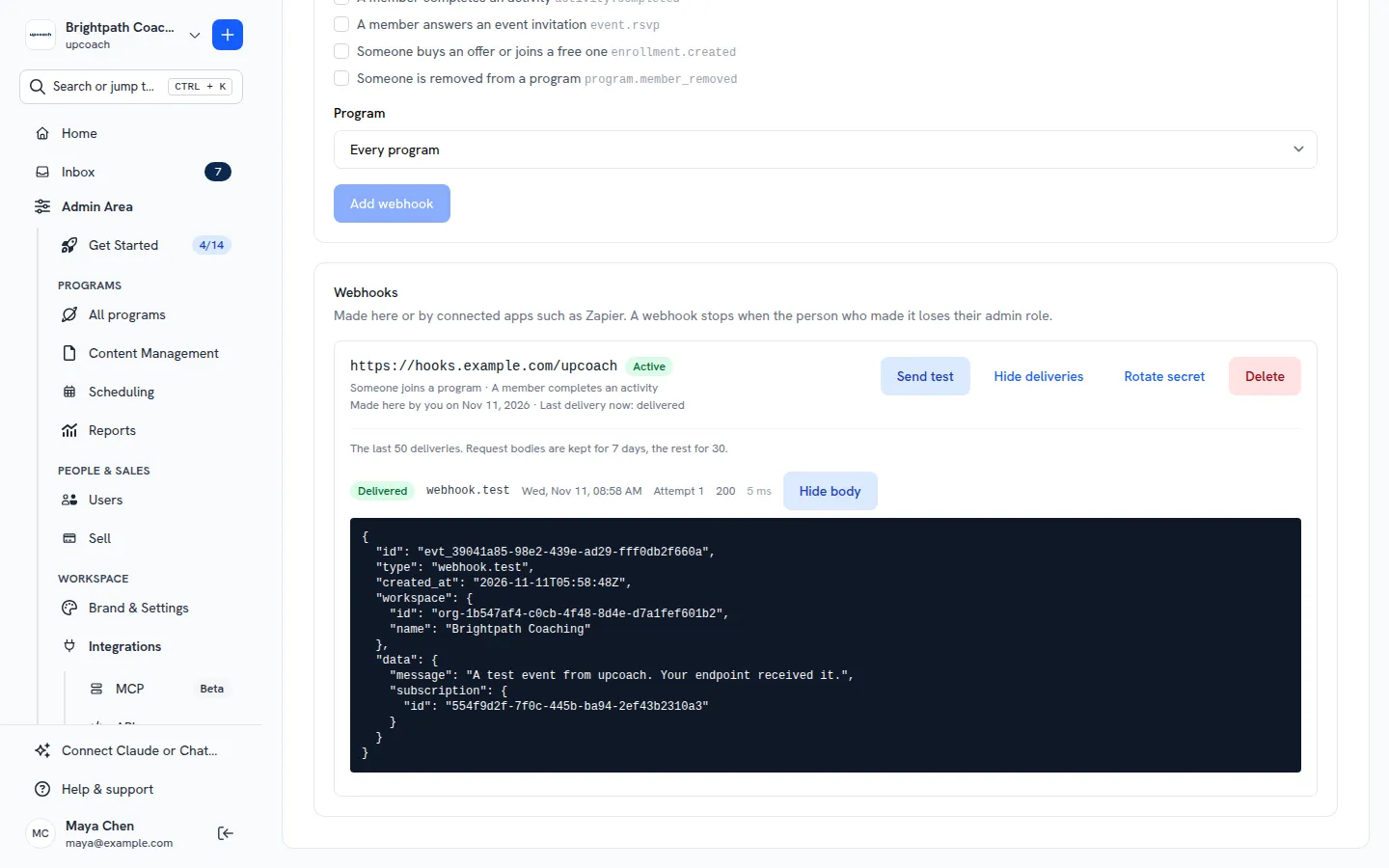
Webhook status
The list shows each webhook’s status:
- Active: deliveries go out
- Off: deliveries failed: click Turn on once your endpoint works again
- Off: its creator lost access: the person who made it lost their admin role, or the token or app that made it was revoked or disconnected. It stays off. Delete it and add a new one
Webhooks made over the API show up in this list too, marked “Made over the API”.
What to do next
- Use the upcoach API and webhooks: the base URL, errors and rate limits
- upcoach API endpoint reference: manage webhooks from your own code