



New AI connector
Connect Your AI Assistant
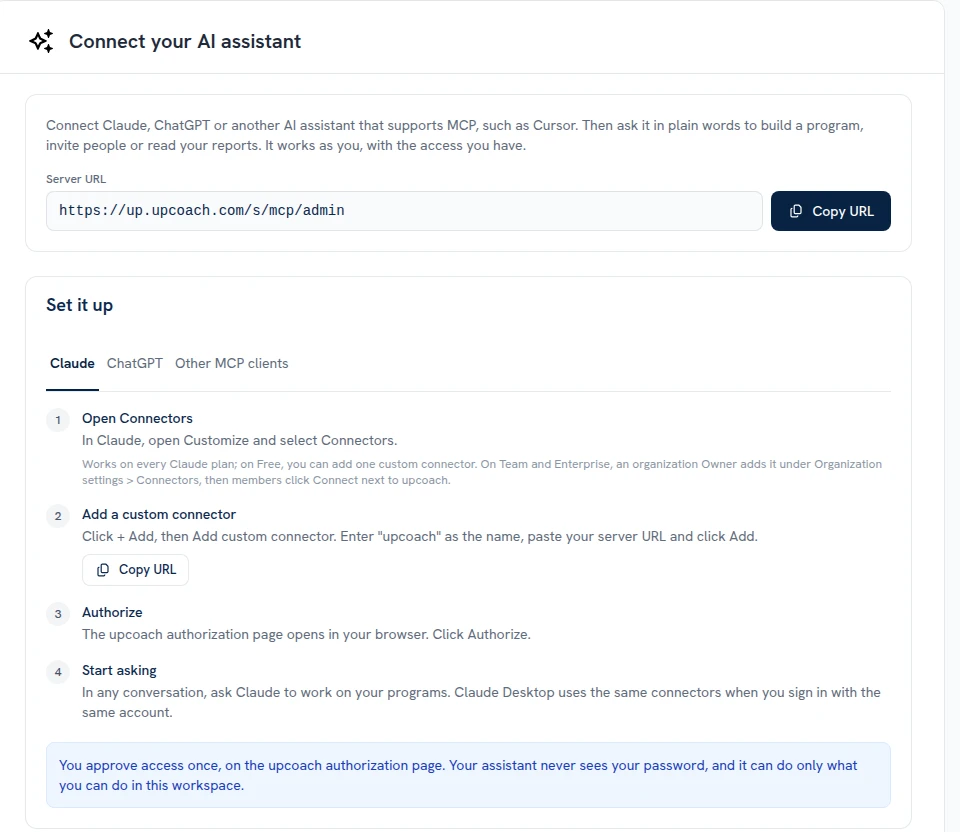
The AI connector page now welcomes any AI assistant: Claude, ChatGPT, or another app that supports MCP, such as Cursor. Click Connect your AI assistant at the bottom of the sidebar, or open Admin Area > Integrations > AI assistants. Your assistant works as you, with the access you have.
- Copy the server URL in one click: Copy URL is at the top of the page and again in the setup steps
- Steps for your assistant: the Claude, ChatGPT and Other MCP clients tabs walk you through adding upcoach, with Cursor’s settings ready to copy
- What it can and can’t do: two lists show what your assistant can do in your workspace and what it can’t
- Your connected apps: each app you connected is listed with when you connected it and when it was last used, and a Disconnect button
 Read more