



Archive a Program
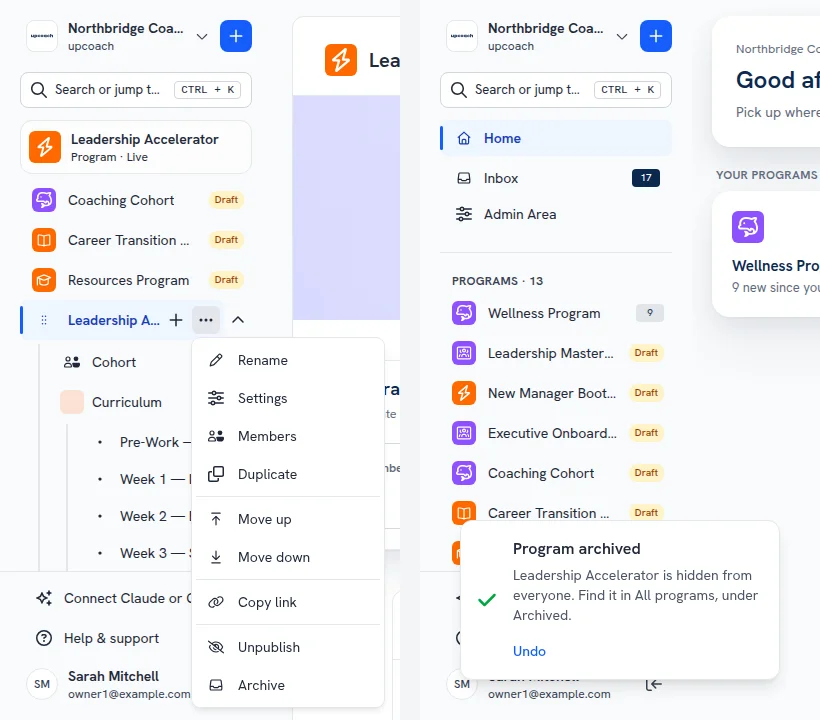
Finished programs can now be archived. Open a program’s menu in the sidebar or on the All programs page and select Archive. The program leaves everyone’s sidebar, and its content, members, answers and reports are kept. Changed your mind? Click Undo in the message that confirms it.
While a program is archived, only Owners, Admins and Implementation Admins can see it, under the Archived status on the All programs page and in Program Reports. Nothing is sent from it: no notifications, reminders or calendar invites. It doesn’t count toward your plan’s program limit.
A program with upcoming events, a live offer or active subscriptions can’t be archived yet. upcoach lists what is still running, with links, so you can wrap it up first.
To bring it back, set the Status filter on the All programs page to Archived and select Un-archive. The program returns as it was, Draft or Live, when your plan has room for it.
 Read more